DIY woodworking plans · Digital download
TedsWoodworking: digital woodworking plans for your next DIY project
Step-by-step project plans you download from a members area. See what the seller says is inside, what it cost when we checked and what is optional, all before you head to the seller's site.
- Digital plans, not a kit: according to the seller, you get a login to download PDF and DWG plans. No lumber, tools or finished furniture.
- Step-by-step instructions, cut lists, materials lists and drawings in the plans, according to the sales page. We did not inspect the plans ourselves.
- Mostly beginner plans, the seller says, with some intermediate and advanced ones. Most call for a table saw, a drill, clamps and a sander.
Paid link: we may earn a commission if you buy.
See the plan library on the seller's site(opens in a new tab)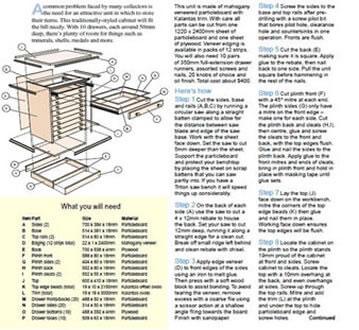
Digital plans, not a woodworking kit
TedsWoodworking is a digital product. According to the seller, buying it gives you a login to an online members area where you download woodworking plans as PDF and DWG files. You are buying plans and instructions, not a kit, lumber, tools or finished furniture.
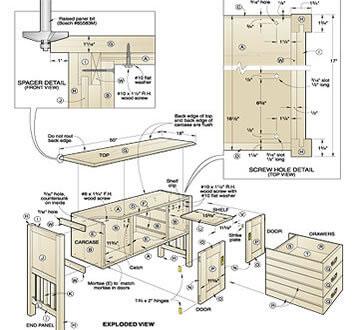
The seller's page mentions DVD or USB copies for an additional fee, without a price, and we did not see that option in the checkout. The standard purchase is digital only.
What's inside the plan library
The seller says the library holds more than 16,000 woodworking plans, grouped into categories such as furniture, storage, outdoor and garden, sheds and shelters, and workshop projects. We could not access the members area to count or inspect them.
- Plans with step-by-step instructions, cut lists, materials lists and drawings, according to the sales page. We did not inspect the plans ourselves.
- Keyword search plus filters for category and difficulty (beginner, intermediate, advanced), as the seller describes the members area.
- Four bonuses listed on the sales page: a DWG/CAD plan viewer program, about 150 woodworking videos, a guide on starting a woodworking business and about 200 pages of woodworking guides.

How you get your plans
- Pay at checkout. The checkout states that access to digital products is available once payment is approved.
- Watch your inbox. The seller's FAQ says login details are sent by email.
- Log in and download. According to the seller, plans come as PDF and DWG files from the members area.
- Come back any time. The seller describes access as lifetime, with no expiry date, and says you can log in again to re-download plans.
What you need before you build
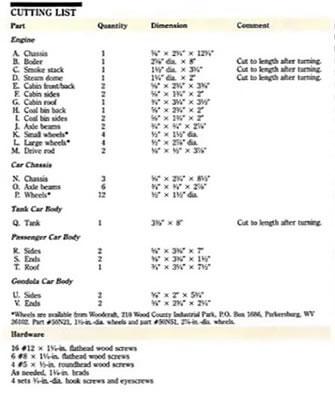
- Your own tools and materials. The seller says most plans need a table saw, a drill, clamps and a sander. Tools, lumber and hardware are not included.
- A skill level to match. The seller says most plans are aimed at beginners, with some intermediate and advanced plans as well.
- A PDF reader. Per the seller's FAQ, plans open in a PDF reader, DWG files need the bonus software, and the members area works on computers, phones and tablets.
- Your preferred units. The FAQ says most plans list both imperial and metric measurements.
- A check with your local building department. The FAQ says the plans are not guaranteed to meet local building codes, so check before starting structures such as sheds or decks.
What's required and what's optional
What you must pay is the main package price. Everything else is optional: the add-ons offered in the checkout, the extra offers shown after purchase (one of them monthly), and a physical copy of the plans. Tools, lumber and hardware for each project are a separate cost.
- Checkout add-ons on September 27, 2026, each priced separately: a guide to jigs and fixtures ($14.95), a hand-tools guide ($9.95) and a book of log home plans ($7.95). They are not needed to use the main package.
- Offers after purchase: the seller's affiliate information lists them at $39.95, $39.97 and $27, plus one that bills $27 per month. We did not see these offers because we did not buy. If you accept the monthly one, it is a recurring charge; the ClickBank policy on recurring subscriptions says they can be cancelled at any time.
- A DVD or USB copy: mentioned by the seller for an additional fee, with no price stated, and not seen in the checkout.
Refund terms shown in different places
The refund terms we found on September 27, 2026 do not match. The seller's sales page and FAQ describe a 60-day money-back guarantee and say refunds are paid within 48 hours of an email request. The ClickBank checkout for this product said returns are allowed within 180 days of purchase, while the general ClickBank return policy describes 60 days at its discretion. Check the terms shown at checkout before you buy. We did not test the refund process.
Questions before you buy
Do I download the plans or receive a kit?
You download them. According to the seller, the standard purchase gives you members-area access to PDF and DWG plans, not a kit. The seller mentions DVD or USB copies for an additional fee, with no price stated, and we did not see that option at checkout.
Is there a monthly fee?
Not for the main package. The sales page calls it a one-time purchase, and the September 27, 2026 checkout showed a single charge with no recurring terms. The seller's affiliate information describes a separate $27-per-month offer after purchase, which we did not see because we did not buy.
Can I open the plans on my phone or tablet?
Per the seller's FAQ, the members area works on computers, phones and tablets. The plans open in a PDF reader, and DWG files need the bonus software.
Ready to pick your first project?
Head to the seller's site for the full product details, then confirm the total, any optional add-ons and the refund terms at checkout before you pay.
Paid link: we may earn a commission if you buy.
Continue to the seller's site(opens in a new tab)- TedsWoodworking sales page
- TedsWoodworking support FAQ
- Seller affiliate information
- ClickBank checkout with United States selected, checked September 27, 2026
- ClickBank return and subscription cancellation policy